Note Update
NumPy基础
NumPy Ndarray对象
- ndarray 对象是用于存放同类型元素的多维数组。
- ndarray 中的每个元素在内存中都有相同存储大小的区域。
- ndarray 内部由以下内容组成:
- 一个指向数据(内存或内存映射文件中的一块数据)的指针。
- 数据类型或 dtype,描述在数组中的固定大小值的格子。
- 一个表示数组形状(shape)的元组,表示各维度大小的元组。
- 一个跨度元组(stride),其中的整数指的是为了前进到当前维度下一个元素需要”跨过”的字节数。
创建一个ndarray只需要调用Numpy中的array函数即可:
numpy.array(object,dtype = None,copy = True,order = None,subok = False,ndmin = 0)事实上我也只用管 object 和 dtype 两个参数就可以了。常见的 dtype 类型:
dtype=int
dtype=float
dtype=np.float64
dtype=np.int32
dtype=complex
complex 是复数类型
import numpy as np
a = np.array([[1,2,3],[3,4,5],[6,7,8]],dtype = complex)
print(a)
'''
        [[1.+0.j 2.+0.j 3.+0.j]
        [3.+0.j 4.+0.j 5.+0.j]
        [6.+0.j 7.+0.j 8.+0.j]]
'''
NumPy数组属性
现在主要了解这几个属性:
ndarray.ndim #数组的秩(rank)
ndarray.shape #数组维度的长度
ndarray.size #数组元素总个数
可以理解为 ndarray.ndim == len(ndarray.shape)
ndarray.shape也可以调整数组大小:
import numpy as np

a = np.array([[1,2,3],[4,5,6]])
a.shape =  (3,2)
print (a)

'''
		[[1 2]
		 [3 4]
		 [5 6]]
'''
NumPy创建数组
-
numpy.empty
import numpy as np
x = np.empty([3,2], dtype = int)
print (x)
'''
[[ 6917529027641081856  5764616291768666155]
 [ 6917529027641081859 -5764598754299804209]
 [          4497473538      844429428932120]]
'''
元组元素均为随机值
-
numpy.zeros
import numpy as np # 默认为浮点数 x = np.zeros(5) print(x) ''' [0. 0. 0. 0. 0.] ''' # 设置类型为整数 y = np.zeros((5,), dtype = int) print(y) ''' [0 0 0 0 0] ''' # 自定义类型 z = np.zeros((2,2), dtype = [('x', 'i4'), ('y', 'i4')]) print(z) ''' [[(0, 0) (0, 0)] [(0, 0) (0, 0)]] ''' -
numpy.ones
import numpy as np

# 默认为浮点数
x = np.ones(5)
print(x)
 '''
 [1. 1. 1. 1. 1.]
 '''
# 自定义类型
x = np.ones([2,2], dtype = int)
print(x)
'''
[[1 1]
 [1 1]]
'''
NumPy从数值范围创建数组
numpy.arange(start, stop, step, dtype)其中起始值默认为0,步长默认为1
np.linspace(start, stop, num=50, endpoint=True, retstep=False, dtype=None)numpy.linspace用于创建一个一维数组,由等差数列构成
| 参数 | 描述 |
|---|---|
start | 序列的起始值 |
stop | 序列的终止值,如果endpoint为true,该值包含于数列中 |
num | 要生成的等步长的样本数量,默认为50 |
endpoint | 该值为 true 时,数列中包含stop值,反之不包含,默认是True。 |
retstep | 如果为 True 时,生成的数组中会显示间距,反之不显示。 |
dtype | ndarray 的数据类型 |
NumPy切片和索引
ndarray 数组可以基于 0 - n 的下标进行索引,切片对象可以通过内置的 slice 函数,并设置 start, stop 及 step 参数进行,从原数组中切割出一个新数组,也可以通过冒号分隔切片参数 start:stop:step 来进行切片操作。
import numpy as np

a = np.arange(10)
s = slice(2,7,2)   # 从索引 2 开始到索引 7 停止,间隔为2
print (a[s])
'''
[2  4  6]
'''
import numpy as np

a = np.arange(10)
b = a[2:7:2]   # 从索引 2 开始到索引 7 停止,间隔为 2
print(b)
'''
[2  4  6]
'''
冒号 : 的解释:如果只放置一个参数,如 [2],将返回与该索引相对应的单个元素。如果为 [2:],表示从该索引开始以后的所有项都将被提取。如果使用了两个参数,如 [2:7],那么则提取两个索引(不包括停止索引)之间的项。
切片还可以包括省略号 …,来使选择元组的长度与数组的维度相同。 如果在行位置使用省略号,它将返回包含行中元素的 ndarray。
import numpy as np

a = np.array([[1,2,3],[3,4,5],[4,5,6]])
print (a[...,1])   # 第2列元素
print (a[1,...])   # 第2行元素
print (a[...,1:])  # 第2列及剩下的所有元素
'''
[2 4 5]
[3 4 5]
[[2 3]
 [4 5]
 [5 6]]
'''
NumPy Matplotlib
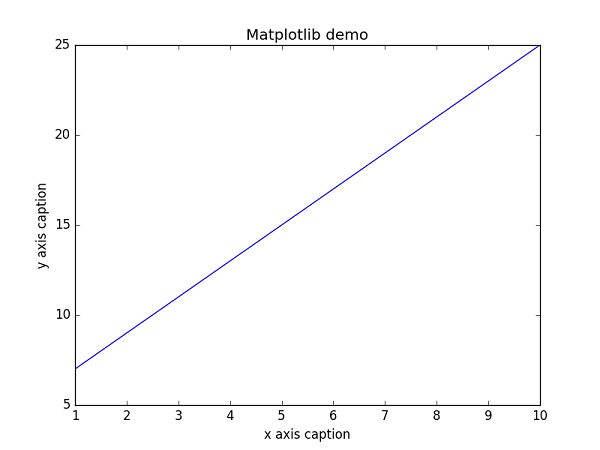
Matplotlib 是 Python 的绘图库。这里只给出一个基础示例,详细内容在下一个项目文档中展示。
示例
import numpy as np
from matplotlib import pyplot as plt

x = np.arange(1,11)
y =  2  * x +  5
plt.title("Matplotlib demo")
plt.xlabel("x axis caption")
plt.ylabel("y axis caption")
plt.plot(x,y)
plt.show()